Frequently Asked Questions
Quick answers about ordering, delivery, payment, returns and your trade account.
Order
Below you will find information about the ordering process.
No, it is not possible to change an order once it has been placed. Items cannot be added, and the quantity of ordered products cannot be modified.
Why is this? To guarantee the fastest possible delivery, our processes are fully automated. Once an order is confirmed, it is processed immediately, making system-technical changes impossible.
What can you do? If you need additional items, please simply place a new order via our webshop.
There can be several reasons why you haven’t received an order confirmation from ESTG yet. Below are some common causes and what you can do:
- Check your spam/junk email: Sometimes confirmation emails can end up in your spam or junk folder. Be sure to check these folders in your email account.
- Incorrect email address: It’s possible that the email address entered during the ordering process was incorrect. Double-check that the email address provided is accurate.
- Processing delay: Occasionally, processing your order might take a bit longer, especially during busy periods. Please wait a few hours and check your email again.
- Technical issues: There may be technical issues in ESTG’s system. In that case, we advise you to contact customer service.
What to do?
Contact customer service: If you still haven’t received a confirmation after following the steps above, please contact our customer service. Make sure to mention your order number and the date of your order for quicker assistance.
That's unfortunate. We ship the products you have ordered and that are in stock on the date you selected for shipping. You can find this date in your "My Account" by clicking on "Orders." If you haven't received all of these products, please inform our customer service, and we will look into it. For products that are not in stock, the expected shipping date is also indicated in your "My Account" under "Orders." You can rely on this date.
To view the current stock and availability of a product, you need to be logged in to ESTG. Afterward, you can check if each product is in stock. It's possible that items may not be in stock at the time of ordering or may have a delivery time, which will be specified.
No, we always deliver your order in one go. Is an item temporarily out of stock? This may affect the delivery time of your entire order.
Tip! Want to make sure your order is shipped as quickly as possible? Place a separate order for items that are currently out of stock.
Yes, it is possible. To ensure we always offer our customers the best possible conditions, our prices are already calculated with very slim margins. However, we have simplified the process for larger orders:
Automatic quote function in the shopping cart From a cart value of €25,000 (excl. VAT), an option to request an official quote will automatically appear in your shopping cart. This is the fastest way for large orders.
Requests under €25,000 For amounts below this threshold, price reductions are generally not possible due to the current market situation and our already optimized margins. We strive to offer the fairest prices to all customers directly in the webshop.
Best price check (competitors) If you have seen an identical product at a lower price from a competitor and this is the reason for your request, we will be happy to check it for you. In this case, please send us the specific counter-offer (including details on availability and shipping costs) via our ticket form. We will forward this information to our purchasing department for review.
At ESTG, ESTG does not offer exchanges or replacements. If you require a different product, please simply place a new order via our webshop.
Important note regarding damage or shortages: If a product is defective, damaged upon delivery, or incomplete, you must report it in writing to our customer service department within 5 working days of receipt. Contact our customer service team via the details on our Contact page.
-
In case of transport damage: Also photograph the damaged packaging and item before unpacking or accepting the delivery. Note the damage directly on the carrier's delivery note at the time of delivery. Claims cannot be processed without this notation.
Payment
Below you will find information about payments.
Once we have processed your return, we will refund your money to your account within seven working days.
Understanding your business credit
Want to know your financial status? You can find all relevant details in your account under 'Business Credit'. Here, you have direct insight into your outstanding balance, available credit, and your total credit limit. The table also provides a handy overview of all recent updates regarding your credit.
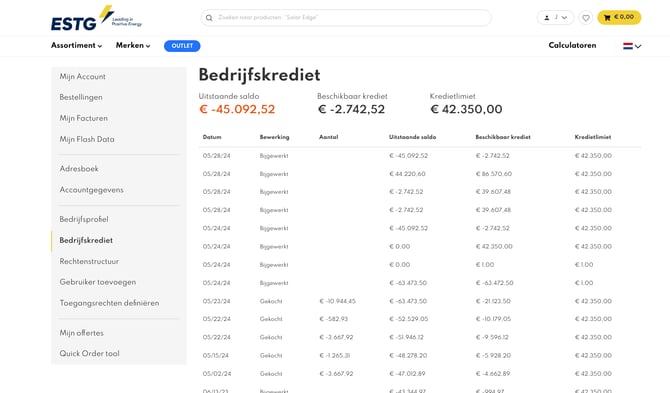
Ordering and the credit limit
Have you reached your limit? No worries, you can continue to place new orders. Please keep in mind that we only ship orders that fall within your available limit. In your account overview, you can see exactly which orders are ready for shipment.
Payment of invoices
To ensure fast processing of your orders and clear administration, we ask you to always pay invoices in chronological order (from oldest to newest). This ensures a smooth order flow and prevents delays in the processing of your orders.
Direct payment methods (iDEAL, Bancontact, Creditcard, or PayPal):
Do you choose one of these methods? Then we process your payment immediately. Once the transaction is completed, we release your order for shipment right away.
Bank transfer:
After you have placed the order, you will receive payment instructions via MultiSafePay. You have 3 working days to transfer the amount. Please note that it takes 2 to 3 working days after your transfer before we have processed the payment and ship the order.
Please note:
If we have not received the payment within 5 days, our system will automatically cancel the order.
If you chose the "Bank Transfer" payment option, your payment is processed via our partner MultiSafePay. Strict guidelines apply to ensure the payment is automatically linked to your order.
Why was my order cancelled? Our system automatically cancels orders if no payment is registered within 7 working days. Successful registration only occurs if:
-
The exact amount was transferred.
-
The payment was sent to the correct IBAN (as specified in the MultiSafePay email).
-
Only the 16-digit reference number was included in the payment description (no other info like your name or order number).
What to do if you have already paid? If your order was cancelled but you have already transferred the money, don't worry. Your funds are safe. Please proceed as follows:
-
Contact us via our ticket form.
-
Be sure to upload a proof of payment (bank statement or screenshot).
-
Our finance department will manually verify the payment, and we will discuss the next steps with you.
How do I complete a bank transfer payment for my order?
How does the payment work?
To pay by bank transfer, follow the instructions in the MultiSafePay email: transfer the exact amount to IBAN NL92 DEUT 0735 1144 39. Always include the payment reference stated in the email to ensure your payment is correctly matched to your order.
What are the deadlines and processing times for bank transfer payments?
Payment term:
You have 3 working days to complete the payment.
Cancellation:
If we do not receive the payment within 5 days, our system will automatically cancel the order.
Processing:
After your transfer, it usually takes 2 to 3 working days before the payment is processed and we release your order for shipment.
You will find an overview of all your invoices under 'my account'.
We regularly add to our payment options. Currently, you can pay by: iDeal, Bank transfer, Credit card, Paypal, SEPA or using a credit facility. A complete overview of payment options is given in our shopping cart.
How do I confirm a bank transfer payment?
Select Bank transfer during checkout, then confirm the order in the payment window. You can leave the bank information fields blank and click Confirm in the bottom right. After that, you will receive a link with the payment details from MultiSafepay.
What should I expect after choosing bank transfer?
Once the bank transfer option is selected:
- Choose Bank transfer as the payment method.
- In the payment window, leave all bank information fields empty.
- Click Confirm in the bottom right.
- Watch for an email or payment link containing the bank transfer instructions from MultiSafepay.
- Complete the transfer using the provided payment details.
Even for an instant transfer, validation can take around 2 business days.
When is my order processed?
Orders are processed once the payment has been received. If payment has already been made, no further action is needed and processing can begin.
What if I do not receive the payment link?
If you do not receive the payment link after placing the order, you can provide the order number so the payment information can be checked.
How long do I have to pay?
Payment should be completed within 3 days to avoid cancellation. After that period, the order expires and the items are released back into the webshop.
Ordering on credit is possible at ESTG, but certain conditions apply.
We only offer this option to regular customers who have placed multiple orders with us and have paid them in full.
Have you ordered from us before and meet these conditions? Then we’ll be happy to review your request to order on credit. Please contact our customer service team. We’ll assess your request and let you know as soon as possible what the options are.
Please note: It is not possible to place orders on credit without prior approval.
Shipping
To ensure smooth delivery of your goods, we adhere to the following delivery conditions.
Delivery Window
Deliveries take place on weekdays between 8:00 a.m. and 5:00 p.m. (local time).
Address & Receipt
Your order will be delivered to the address specified at checkout. A person authorised to receive the goods must be present to sign upon delivery.
Site Access
The unloading location must be accessible to trucks up to 15 metres in length, 4.5 metres in height, and 35 tonnes in weight. Please contact us in advance if in doubt.
Unloading
Delivery is to the first threshold at ground level.
Note: pallet trucks cannot operate on gravel, grass, thresholds, or unpaved surfaces.
Groupage Unloading Specifications:
- Max. dimensions per pallet: 240 × 180 × 220 cm
- Max. weight per pallet: 1,500 kg
- Max. weight for tail lift: 1,000 kg per pallet
Are you unable to meet the above conditions?
Then choose our “Scheduled On-Site Freight” option. This gives you a customized delivery that seamlessly matches your needs and situation.
At ESTG, you can easily choose the delivery option that suits your schedule and project requirements. Below is an overview of all available options, including the key differences.
- Standard Pallet Freight: Our standard and most sustainable option.
Expected shipping time: shipped within 3–5 working days. - Express Pallet Freight: Your order is prioritised and delivered faster.
Expected shipping time: shipped within 1–3 working days, depending on destination. - Express Pallet Freight (Before 12:00 PM): Your order is prioritised and guaranteed to be delivered by 12 noon.
Expected shipping time: 1–2 working days, depending on location. - Express Pallet Freight (Before 10:00 AM): Your order is prioritised and guaranteed to be delivered by 10 a.m.
Expected shipping time: shipped within 1–2 working days, depending on location. - Scheduled On-Site Freight: Your order is delivered by appointment and unloaded on site.
You will receive a call to schedule the delivery, and the driver unloads your goods at your chosen location.
Expected shipping time: shipped within 2–5 working days (depending on phone appointment).
Good to know: with each shipment, you automatically receive a tracking link once your order has been dispatched.
ESTG calculates shipping costs directly in the account shopping cart. Exact delivery charges depend on weight, item volume and delivery address. No hidden logistics surcharges are included in catalog prices; the rate accurately reflects the order volume. Updated logistics conditions apply per region.
Shipping methods and options
In the shopping cart, choose the shipping method matching the project requirements:
- Standard pallet delivery: Lowest CO2 emissions and cost-effective. Delivery within 2 to 10 business days after the chosen shipping date. Please note: delivery by truck (not suitable for narrow streets).
- Express pallet delivery: Fastest delivery. Delivery within 2 to 5 business days after the chosen shipping date. Please note: delivery by truck.
- Scheduled on-site delivery: Delivery by appointment. Following the chosen shipping date, a delivery window is planned together for door-to-door service.
With standard delivery options, the recipient is responsible for unloading goods at the delivery location. Transport rates are evaluated weekly based on current market developments.
What to do?
Add the required items to the account shopping cart to view exact shipping costs and applicable discounts in real time. Contact us directly for any questions.
If your delivery is delayed, check your track & trace information for the current schedule. You will have received this from us after shipment. Please contact our customer service if the expected delivery date has passed by 24 hours.
Yes, smaller orders can be shipped as a parcel, provided the items are suitable for this method. This is often faster and more cost-effective than a pallet shipment.
Automatic selection in the webshop
You do not need to request parcel shipping separately. Our webshop automatically checks the weight and dimensions of the selected items when you build your shopping cart. If the products are suitable for parcel delivery, this option will automatically appear as a shipping method during checkout.
Conditions for parcel delivery
For a smooth delivery, the following conditions must be met:
- The delivery location must be easily accessible for a standard delivery van.
- Delivery takes place on working days between 08:00 and 17:00.
- Someone must be present to sign for receipt.
Important note: If it turns out during delivery that the location is not accessible or no one is present to receive the shipment, we will have to pass on any additional costs. Please ensure that all conditions are met on the delivery day.
Unfortunately, collecting orders from our warehouse is not possible. Our logistical processes are largely automated to ensure the fastest and most efficient delivery to your location.
Why is collection not possible?
Manual intervention in these automated processes would disrupt the coordination between different departments. This causes logistical delays and negatively impacts our fast delivery times. Therefore, all orders are shipped exclusively via our transport partners directly to you or the project site.
Delivery directly to the site with Targo on-site
Are you looking for a convenient solution for unloading on-site? With our shipping option Targo on-site, your order is delivered by appointment and unloaded directly at the chosen location by the driver.
At ESTG, you can easily select the pallet or parcel delivery option that best matches your schedule and project requirements. You can view all available options and real-time rates directly in the shopping cart of your account.
- Standard Parcel Delivery: Ideal for smaller orders and accessory shipments. Delivered via standard parcel networks.
-
Standard Pallet Freight: A sustainable and cost-effective choice for business addresses. Orders are delivered within 2 to 10 business days after your selected shipping date.
Please note: Delivery is made by heavy goods vehicle (HGV) and is not suitable for narrow or residential streets.
-
Express Pallet Freight: Our fastest pallet delivery option for time-sensitive projects. Orders are delivered within 2 to 5 business days after your selected shipping date.
Please note: Delivery is made by heavy goods vehicle (HGV) and is not suitable for narrow or residential streets.
- Scheduled On-Site Freight: The optimal choice for deliveries to residential addresses, difficult-to-access locations, or active construction sites. Following your chosen shipping date, a specific delivery window is scheduled together for door-to-door service.
- Regulated Goods Freight (ADR): Certified transport dedicated to battery-only and hazardous goods shipments, fully compliant with international safety regulations.
Yes, as soon as your order is ready for dispatch, you will automatically receive a Track & Trace code or a delivery notification. The way we inform you depends on the type of delivery:
-
Groupage deliveries (up to 4,000 kg): You will receive an email with a tracking link. This allows you to easily follow the shipment from the moment of collection until delivery.
-
Scheduled On-Site Freight: Did you choose "Scheduled On-Site Freight? We will contact you personally in advance to schedule a specific delivery appointment.
On the morning of the delivery, we will send you an SMS or email confirming that the order is on its way. Please note: no specific time slot is mentioned in this message.
Would you like to know the status of your shipment in the meantime? Feel free to contact our customer service.
Returns and warranties
All documents can be found on the product detail pages.
Please use the search function on our website
You will find all available documents in the product details:
This depends very much on the product and the manufacturer concerned. Please contact our customer service. We will ensure that the matter is correctly handled and mediate for you with the manufacturer.
RMA and return requests are approved only in exceptional cases. The category "Returns (RMA)" can be selected using our contact form.
Exceptional cases for approval
- Wrong item delivered: ESTG delivered a different item than the item ordered.
- Refused due to transport damage: Delivery acceptance was refused due to damage, and the damage was noted on the carrier's consignment note.
Review and processing
- Data verification: Once all details have been filled out correctly, a review will determine whether an RMA can be granted as an exception.
- Cost information: If an RMA is approved, notification regarding the applicable costs will be provided.
- Credit note: Applicable transport costs and processing fees will be deducted from the credit note.
Conditions for submitting a request
- Unused condition: Products must be unused.
- Original packaging: Packaging must remain unopened, without any additional markings or stickers.
- Exclusion of batteries: RMAs are not offered for batteries. Returning batteries is categorically excluded.
What to do? Select the "Returns (RMA)" category on the contact page and complete all required fields. Submit the request within 5 working days of delivery. For further inquiries, please reach out to customer service.
Once you’ve registered your return, you’ll automatically receive a confirmation email from us. We’ll also keep you updated via email about each step in the process, such as the receipt of your shipment and the progress of the handling.
Once we’ve physically received the return, we aim to assess and process it within 5 working days. You’ll receive a notification with the outcome, for example, a credit note or a replacement product.
If you have any questions in the meantime, feel free to contact our customer service.
If your delivery arrived damaged, please report it to us as soon as possible using the steps below. Submitting a complete damage report promptly helps us resolve your claim quickly.
Follow the steps below to report the issue quickly and correctly:
-
Fill out the ticket form on our website and select the category "Damage"
-
You will automatically receive an email from us with a link to the damage report form. Please complete this form in full.
-
Make sure to include all required information:
-
Clear photos of the damage and the packaging
-
A copy or photo of the Proof of Delivery showing the damage
-
Your order information and contact details
-
Important:
To ensure your claim can be processed, all of the following conditions must be met:
-
The damage report form is fully completed
-
The damage is noted on the legally valid Proof of Delivery
-
The report is submitted to us within 24 hours after delivery If you miss the 24-hour window, we may be unable to process your claim. In that case, please contact our customer service team to discuss your options.
-
The photos are clear and legible
We aim to assess your claim within 2 working days. Once we have reviewed the damage, we will contact you to discuss the next steps, which may include a replacement, repair, or refund depending on the situation.
You will receive your individual Growatt installer code immediately after registering with Growatt. This code is linked to your account and is required for configuring specific settings and advanced functions on Growatt systems.
How to obtain the code:
-
Registered installers: Check the confirmation email you received from Growatt after signing up.
-
New users: Register officially as an installer on the Growatt website to obtain your own code.
-
End users: Please contact a certified installer in your area. The installer code is intended exclusively for professionals trained in the maintenance of these products.
Don’t have an account yet? Sign up via the Growatt portal. For other questions regarding your orders, please visit our webshop.
Reach out to Growatt again by sending a follow-up email to service.nl@growatt.com. Clearly include the following information in your message:
-
- The reference or ticket number of your original claim.
- Your company details and order information.
- A short explanation that you have not received a response yet.
-
Your company details and order information
-
A short explanation that you haven’t received a response yet
Should I include my original request in the follow-up?
To speed up the process, it’s helpful to resend your original email along with any attachments (such as photos or documents).
Contact ESTG if needed
Still no reply from Growatt after your follow-up? Then contact our customer service. ESTG can support you with the next steps and, if necessary, assist with further communication. You can reach our customer service team via the ESTG support portal.
ESTG will work with you to ensure your claim is resolved as efficiently as possible.
If a technical defect occurs in one of your Growatt devices, the fastest way to a solution is a direct report via the Growatt Online Service System (OSS). Please follow these steps for efficient processing:
Step 1: Report via the Growatt OSS Portal
As a registered installer, you can open claims (RMA) directly in the portal. This significantly shortens the processing time:
-
Log in to oss.growatt.com with your installer credentials.
-
Click on "Service Hall" in the left navigation column.
-
Select the sub-item "Service Online".
-
Click the "+ Add" button at the top right to create a new ticket.
-
Enter the serial number (S/N) of the device and select the appropriate fault type.
-
Important: Under "Attachment", be sure to upload photos of the display (error code), the type plate, and the measurement (DC/AC voltage). The ticket cannot be processed without this evidence.
-
Click "Submit". You will then receive a ticket number (e.g., SO...).
Step 2: Alternative via the Growatt Support Page
If reporting via the OSS portal is not possible, please use the official contact form on the Growatt Support Page.
Note: Please ensure that you include all the details mentioned above, such as the serial number, error description, photos of the installation, and measurement values in your message to Growatt to avoid delays.
Step 3: Support from ESTG Support
Our goal is to get your project back up and running as quickly as possible. If you have not received a response from Growatt within 5 working days, we will be happy to assist you with the escalation.
In this case, contact us via our contact form and strictly provide the following information:
-
Product number & serial number of the device
-
A brief description of the problem
-
Your existing Growatt ticket number (from step 1 or 2)
We will then immediately contact Growatt support to speed up the process for you.
Useful links:
If you ordered a Growatt product through ESTG and would like to return it, please follow this step-by-step guide to ensure a fast and efficient return process.
1. Check the Warranty
Growatt products usually come with a standard 5-year warranty from the date of installation. Make sure to keep your original purchase invoice and installation documents, as you will need them for a return.
2. Contact Technical Support
To request technical support send an email to Growatt at service.nl@growatt.com. Make sure to include the following information:
- Serial number of the product
- Brief description of the issue or error code
- Photos of the problem and installation (if relevant)
3. Request an RMA
If Growatt customer service determines that your product is defective and covered under warranty, they will issue a Return Materials Authorization (RMA) number. This number is required to process your product return.
4. Submit your return and ship the product
Once you have received your RMA number from Growatt, follow the instructions provided by Growatt to return your product, and ensure the RMA number is clearly visible on the shipping label.
Remarks & Conditions
- Requirements: The product must have a defect, or be new, unused, and in its original packaging to qualify for a return.
Follow these steps to return your Growatt product efficiently. Once you have received an RMA number from Growatt, ESTG can provide further support if needed.
Contact details for Technical Support
- service.nl@growatt.com
Useful Links
Growatt aims to respond to support requests within 48 hours. If you do not receive a response within this timeframe, it is recommended to contact customer service again or take further action through ESTG.
Contact details for Technical Support
- service.nl@growatt.com
Useful Links
- Product Condition: The product must be new, unused, and in its original packaging.
- Return Materials Authorization (RMA) Number: An RMA number is required to return the product. You will receive this number from Growatt customer service upon approval of your request.
- Warranty Period: Ensure your product is within the warranty period. Growatt products typically come with a standard 5-year warranty from the date of installation.
- Proof of Purchase: Keep your original purchase invoice and installation records, as you may need them for the return process.
- Reason for Return: The product must be defective or not functioning properly to qualify for a return.
Contact details for Technical Support
- service.nl@growatt.com
Useful Links
- Go to the Growatt Warranty Portal: https://en.growatt.com/support/warranty
- Log in with your Growatt account: If you do not have an account yet, you can create one for free on the website.
- Enter the serial number of your Growatt product: You can find the serial number on the label of your product.
- Click "Search": The status of your warranty claim will be displayed.
You can also find the following information on the portal:
- The date your warranty claim was submitted
- The reason for your warranty claim
- The current status of your warranty claim
- Any updates regarding your warranty claim
Useful Links
For technical questions, setup issues, or in the event of a defect, Wallbox offers various support channels. Follow these steps to find the right solution as quickly as possible:
1. Use official support (Chatbot Maya)
Visit the Wallbox Support Center. This is the central point for all inquiries. The chatbot "Maya" (bottom right of the page) guides you through the diagnosis process, answers frequent questions, and creates a support ticket for you if necessary.
2. Help via the Wallbox App
-
For installers: You have direct access to the chatbot and dedicated phone support via the Wallbox App. Please note that certification from the "Wallbox Academy" is often required for phone support.
-
For CPOs & fast-charging customers: Dedicated web forms and hotlines are available for charge point operators.
3. Prepare for troubleshooting or warranty claims
Please have the following information ready before contacting support to ensure fast processing:
-
Serial number (S/N) of the device.
-
Proof of purchase (your invoice from ESTG).
-
Error description: Ideally with photos of the installation or screenshots of error messages in the app.
-
UID (User ID): For software issues, providing the UID of the affected charging session helps the support team with their analysis.
4. Follow support instructions
After reporting, you will receive a case number (Ticket ID). Please keep this for any future inquiries.
Many problems can be resolved with a simple software update via the Wallbox App (via Bluetooth or Wi-Fi). Before making a claim, please ensure that the latest firmware is installed on the device.
Useful links:
-
Wallbox Support Center (Central hub for support, FAQs, and manuals)
Required information
Before you begin, make sure you have the following information ready:
-
Total installed capacity (kW)
-
Number of defective products
-
Installation address (for replacement)
-
Project type: Residential or commercial
-
Installation type:
-
Clamp-mounted (vertical installation)
-
Bolt-mounted (vertical installation)
-
Clamp-mounted (horizontal installation)
-
Non-tracking bracket
-
Tracking bracket
-
-
Clear photos showing the issue and the serial numbers
-
Output diagram: a diagram showing performance and the reported issue
-
Serial numbers: a list of serial numbers of the defective products
1. Go to the Trina Portal
Start your warranty claim through the Trina Portal.
2. Enter general information
The first page of the claim process will ask for general details about the installation and the issue.
3. Add serial numbers
On the second page, enter the serial numbers of the defective products.
If you need to enter more than 5 serial numbers, use the “serial number list” template available on the same page.
4. Upload documents and photos
The final page allows you to upload supporting documents and photos that back up your claim, including the serial number list.
Helpful links
For technical questions, configuration issues, or in the event of a defect, Alfen offers specialized support through its own service portal. Since Alfen often requires remote access to the specific serial number (S/N) for diagnosis, the ticket must be opened directly by the installer or CPO.
Please follow these steps for efficient processing:
1. Use the Alfen Ticket System
Visit the Alfen Service Management Portal. If you do not have a user account yet, you must register there once. Then create a new ticket for the specific serial number of your Alfen product.
2. Required Information & Service Report
Have the following details ready when creating the ticket to avoid delays:
-
Serial Number (S/N): This usually begins with "ACE...".
-
Detailed error description: What exactly is the problem?
-
Photos: Images clearly showing the error and the type plate.
-
IMPORTANT (Service Report): Alfen almost always requires a current Service Report. You can obtain this via the Alfen ACE Service Installer Tool by connecting your laptop directly to the charging station. Be sure to attach this report to the ticket.
3. Processing and Serial Number Management
Once a charging station is registered in the Alfen portal, ESTG no longer has access to the internal error messages or the management of this specific serial number. However, we are still happy to support you with information from the Alfen Knowledge Base.
4. Help with backend issues (Road / e-flux)
If your problem does not concern the hardware, but rather the backend or billing (e.g., via e-flux), please contact the support of Road (formerly E-Flux). For hardware defects, however, Alfen always remains the primary contact.
Useful links:
-
Alfen Service Management Portal (Ticket creation & RMA)
-
Alfen Knowledge Base (Solutions for error codes & manuals)
-
Road (formerly E-Flux) Support (Help with backend questions)
1. Create an installer account with Sungrow
Visit the Sungrow website and register for an installer account.
2. Log in to your installer account
Log in to your account via the Sungrow website.
3. Create a ticket
Open a new ticket in your installer account. Make sure to provide all required information, such as:
-
Product serial number
-
Description of the issue
-
Photos clearly showing the issue and the serial number
4. Sungrow will handle the issue
Once your ticket is submitted, Sungrow will take care of the warranty claim and guide you through the resolution process.
Helpful link
1. Gather the required information
Make sure you have the following details ready before you begin:
-
Country/region of installation
-
Installation date
-
Device serial number
-
Error code
-
Date the error occurred
-
Detailed description of the issue
-
Photo of the error code
2. Fill in the RMA request form
Go to the Fox ESS RMA request page and complete the form with the required information.
3. Submit the RMA request form
After filling in the form, submit it via the website.
Ensure all required fields are completed accurately to avoid delays.
4. Wait for confirmation and further instructions
After submission, you’ll receive a confirmation of receipt. Fox ESS will review your request and get in touch with further instructions.
You may be asked to provide additional information or take further steps to verify the issue.
5. Follow instructions from Fox ESS
Follow all directions provided by the Fox ESS support team.
This may include returning the defective product for inspection or replacement.
Service
Email: info@fox-ess.com
Frequently asked questions
- How long does it take to process a warranty claim?
Fox ESS typically provides an initial response within 1 working day. - What should I do if I don’t receive a response?
Contact customer service or the local service unit if you haven’t received a reply within the expected timeframe. - Can I submit a warranty claim for multiple products at once?
Yes, you can include multiple products in one claim. Be sure to list the serial numbers and details for each product in the RMA form.
By following these steps, you can submit a warranty claim for your Fox ESS product and ensure a quick and efficient resolution to your issue.
Technical Support
For technical queries or faults with Growatt products, service is provided through Growatt's official network. As of July 20, 2026, Growatt has discontinued its telephone hotline, meaning phone support is no longer available. All inquiries and requests for information are processed exclusively digitally through dedicated channels.
Recommended step-by-step plan for technical questions or problems
1. Perform a basic check
Before contacting customer support, a basic check is recommended:
- Ensure that the product is correctly installed.
- Check the power source and all cable connections.
- Consult the Growatt Support Page for common issues and solutions.
2. Make use of digital support channels
If the issue remains unresolved, you can use the following options:
- Growatt OSS Installer Portal (Recommended): The portal serves as the central hub for support requests, warranty claims, technical questions, and access to technical documentation such as manuals, datasheets, and software/firmware updates.
- Email contact: For technical support, you can send an email to service.nl@growatt.com. To ensure prompt processing, always include the following information:
- Product serial number
- Clear description of the issue or error message
- Photos of the problem and the installation (if relevant)
- Service for mobile callers: When calling the old phone number, an SMS containing a WhatsApp link and email contact details will automatically be sent to you.
3. Processing time and escalation
- Processing requests submitted via the OSS portal or email generally takes up to 5 business days.
- Follow any further instructions provided by Growatt customer service.
- No response received? If you have not received a response from Growatt within 5 business days, ESTG can escalate the matter to the manufacturer on your behalf. In that case, please contact our customer service.
Helpful links
To gain access to professional features and Growatt technical support, you must register officially as an installer. Please follow this step-by-step guide:
-
Visit the Growatt Registration Page: Go to the official Growatt registration page
-
Select the "Installer" tab: Click on the "Installer" tab to open the registration form for professionals.
-
Fill in the registration details: Enter the required information in the appropriate fields. The following details are now required:
-
Country: Select your location.
-
Serial Number: Enter the serial number of one of your Growatt products for verification.
-
Company Name: Enter your official business name.
-
Company Address: Enter the full address of your company.
-
-
Follow the further instructions: Follow the on-screen instructions to complete your registration.
-
Access the Installer Portal: Once your registration has been processed, you will have access to the portal for monitoring, technical documentation, and direct support.
Useful links:
To register a Growatt product ordered through ESTG, follow this step-by-step guide to complete the registration correctly.
1. Log in to the Growatt website
- Visit the Growatt website and log in using an installer account.
- If no account exists yet, register as an installer. Select the "installer" tab during registration.
2. Navigate to System Settings
- After logging in, access the menu and select "System Settings".
3. Select Installation List
- Within the "System Settings" menu, click on "Installation List" to view an overview of all installations.
4. Add a new product
- Click the "+ Add installer" button to register a new product.
- Enter the required details, such as the serial number of the product and the installation date.
5. Confirm the registration
- Review all entered details and confirm the registration.
Helpful links
What does End of Life (EOL) status mean for a Growatt product?
A Growatt product with End of Life (EOL) status no longer receives official manufacturer support. This means no further software updates, no original spare parts, and minimal or discontinued technical service. The product can continue operating, but carries security, compatibility, and repairability risks.
What are the operational consequences of EOL status?
When a Growatt product reaches End of Life status, official manufacturer support ceases. The key operational consequences are:
- No further software updates: no new updates will be released. Consequently, the device may lose compatibility with new technologies or become vulnerable to security risks.
- No spare parts: in the event of a fault, original spare parts are typically no longer available, making repairs impossible.
- Limited service: technical support and customer service from the manufacturer are minimal or completely discontinued.
What can you do if your Growatt product is EOL?
- Continue using the product: the installation can remain operational as long as it functions correctly. However, take note of the risks outlined above.
- Upgrade to a new model: opt for a current product that receives active support. This ensures access to the latest features, security patches and full service support.
How do I contact Growatt technical support for an EOL product?
For technical support enquiries about an EOL Growatt product, contact service.nl@growatt.com.
How can ESTG help you find a replacement?
To request advice on a suitable replacement product or check current stock availability, contact the ESTG customer service team directly. They can recommend a current Growatt model with active support that matches your system requirements. For Growatt-specific technical support, use the email address listed in the section above.
Helpful links
For technical questions about your SolarEdge products, it is best to contact SolarEdge technical support directly. This is the most efficient way to receive expert assistance for registered installers.
Technical Support and Contact: SolarEdge offers a comprehensive support section on their website. Instead of local phone numbers, we recommend using the SolarEdge Support Center. There you can open tickets, track the status of your requests, and get in direct contact with their technicians.
Online Portals and Useful Tools: In addition to direct support, SolarEdge offers various platforms to assist you in your daily work:
-
Monitoring: Use the SolarEdge Monitoring Portal to monitor your installed systems. (Login required)
-
Edge Academy: Expand your expertise with webinars and training materials in the SolarEdge Edge Academy.
-
Designer: Plan and calculate your projects accurately with the SolarEdge Designer.
To use these portals, you must register once or log in with your existing SolarEdge account.
Having a technical issue or question about a Charge Amps product?
You can contact the Charge Amps support team directly, they’ll be happy to help you through the following channels:
- Online Support Form
Submit your question by filling out the form on the Charge Amps Support Page. - Phone Support
Call the Charge Amps support team at +46 (0)8 400 221 00 (international number). - Email
Send an email to support@charge-amps.com and include the following information:
-
The product’s serial number
-
A brief description of the issue
-
Any photos or screenshots that help illustrate the problem
With this information, they’ll be able to assist you quickly and effectively.
Still need help or have additional questions? Our own customer service team is also happy to assist you.
Helpful links
If your Alfen charging station displays an error, Alfen provides a structured overview to help diagnose and resolve the issue. The error codes are divided into several categories:
Error code categories:
-
1xx codes: Internal malfunctions or issues with the power supply.
-
2xx codes: Installation errors, such as issues with grounding or network configuration.
-
3xx codes: Communication problems between the charging station and the vehicle.
-
4xx codes: External influences, such as extreme temperatures or incorrectly connected accessories.
Where can I find the solution? For each error code, Alfen provides a detailed cause analysis, recommended solution steps, and references to relevant manuals or tools. You can find a complete and up-to-date list of all codes directly in the Alfen Knowledge Base.
Do you have a technical issue or a question about your SMA inverter? Check the options below to get the support you need:
SMA Service Line
For assistance with installation, maintenance or error messages, please call:
-
Belgium: +32 15 28 67 30
-
Netherlands: +31 30 2492 000
Be ready to provide the following information during your call:
-
Device type
-
Serial number
-
Firmware version
-
Any error codes or messages
SMA Online Service Center
Visit my.sma-service.com to:
-
Submit a service request
-
Track the status of your case
-
Request replacement parts
-
Generate Grid Guard and PUK codes
You’ll need an account to access the portal.
Additional support
Still need help or have further questions? Feel free to contact our customer service team, we’re happy to assist you.
Helpful links
SMA includes a QR code with every inverter to streamline the setup process. To install your SMA inverter using the QR code, follow these steps:
-
Download the app: Download the SMA 360° App from the App Store or Google Play Store.
-
Open the app: Start the app and follow the on-screen instructions.
-
Scan the QR code: Scan the provided code. The inverter data will be imported automatically and the installation will begin.
-
Completion: Follow the remaining in-app steps to finish setting up your inverter.
Manual installation (without QR code)
If the QR code is illegible or missing, you can set up the device manually:
-
Network connection: Connect the inverter to your router using an Ethernet cable.
-
Access Sunny Portal: Open your web browser and go to the SMA Sunny Portal.
-
Enter device data: Enter the following information, which can be found on the device nameplate or label (usually located on the side of the inverter housing):
-
Device password / WPA2-PSK
-
PIC code (Product Identification Code)
-
RID code (Registration ID)
-
-
Configuration: Follow the instructions in the Sunny Portal to complete the registration.
If the inverter is not found in the portal, ensure that DHCP is enabled on the router and that no firewall is blocking outbound communication on port 443 (HTTPS) to the Sunny Portal.
**Note:** You will need a free SMA account to use the Sunny Portal. If you do not yet have one, you can register directly on the Sunny Portal website.Useful links:
My Account
An account can be created easily in a few simple steps using the online registration form. Following registration, current prices and stock statuses become visible in the webshop, allowing orders to be placed immediately. Furthermore, additional accounts can be set up for colleagues to share the convenience of the ordering process.
Requirements for registration
- Valid VAT number: A valid VAT number valid for cross-border transactions within the EU is a strict prerequisite for registration. Registration is not possible without it.
What to do? Proceed directly to the registration form to create an account. Enter the company details and the correct VAT number to gain access to the product range. For assistance during registration, please contact customer service.
If you experience issues logging in to your account, please first ensure that you are using the correct email address and password.
Steps to resolve the issue
- Reset password: Have you forgotten your password? You can easily request a password reset via the login page.
- Check login credentials: Make sure there are no unintended extra spaces before or after your email address or password.
- Adjust browser settings: Check your browser settings, clear your cookies and cache, and try again.
Contact us if issues persist
If the login still does not work after following these steps, please reach out to our customer service. Please use our Ticketformular so that we can investigate the issue as quickly as possible.
You can request a new password here: click on 'forgot your password?' and you will receive a reset link to change your password by e-mail.
If you do not receive this e-mail within one hour please check your spam folder.
The personal account environment allows for easy adjustment of key information. This ensures that orders and administration remain accurate.
Company details and addresses
The following items can be managed directly after logging into the account:
-
Company name: the official name of the organisation.
-
Email addresses: both the general email address and the address for invoicing.
-
Main address: the permanent location of the company.
-
Shipping addresses: update the default address or add additional locations for future orders.
Note: for an order already in the logistics process, it is no longer possible to change the delivery address. Billing addresses cannot be adjusted manually; please contact our staff for assistance.
User data and additional accounts
Personal details such as name, email address, and password are managed under the user profile settings. To provide colleagues with access to the webshop, additional users can be added to the business account.
What to do? Log in to the account directly to check or update details. For assistance with changing a billing address, please contact our customer service.
Still have questions?
Our support team is happy to help, Monday to Friday from 8:00 to 17:30.